- CSS 는 페이지의 기본 뼈대인 HTML을 보다 세련되게 표현하기 위한 수단
<html>
    <head>
        <meta charset="utf-8">
        <title>CSS</title>
        <link rel="icon" href="./img/favicon.png">
        <style>
            /* 이 안에 스타일을 지정한다. */
        </style>
    </head>
    <body>

    </body>
</html>
favicon 은 각 사이트를 대표하는 이미지를 브라우저 탭에 표시해 주는 이미지
-favicon 으로 이용할 만한 ico 또는 png 파일이 있다면 다음과 같이 활용 가능


<html>
    <head>
        <meta charset="utf-8">
        <title>tags</title>
        <link rel="icon" href="./img/favicon.png">
        <style>
            /* 이 안에 스타일을 지정한다. */
        </style>
    </head>
    <body>
        <div>div 는 특정 영역에 스타일을 주고 싶을때 사용</div>
        <span>span은 특정 문자에 스타일을 주고 싶을때 사용</span>
        <hr/>
        <details>
            <summary>details & summary</summary>
            <p>화살표를 누르면 이곳의 내용을 보여준다.</p>
        </details>
        <dialog open>open 속성이 있을때와 없을때가 다르다.</dialog>
    </body>
</html>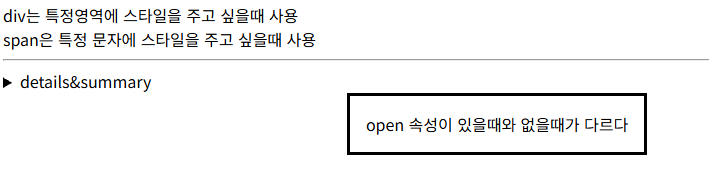

<html>
<head>
<meta charset="utf-8">
<title>emoji</title>
<link rel="icon" href="./img/favicon.png">
<style>
p{
font-size: 100px;
}
</style>
</head>
<body>
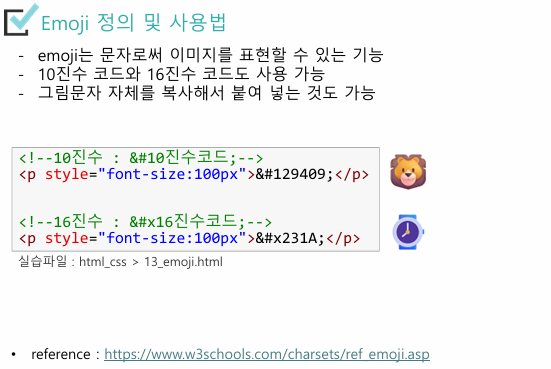
<!--10 진수 사용-->
<p>🦁</p>
<!-- 16진수 사용 -->
<p>⌚</p>
</body>
</html>

<html>
    <head>
        <meta charset="utf-8">
        <title>selector</title>
        <link rel="icon" href="./img/favicon.png">
        <style>
            /*
                p : p 태그들
                #myid : id 가 myid 인 요소
                .myclass : class 가 myclass 인 요소들
            */

            p{
                background-color: cornflowerblue;
            }

            .myclass{
                color: crimson;
            }

            #myid{
                color: darkgoldenrod;
            }

            div>p{
                background-color: deeppink;
            }
            /*p,div : p 와  div 모두*/
            p, div{
                font-weight: 600;
            }

            img{
                /*넓이를 지정하면 비율에 맞춰서 높이도 지정된다.*/
                width: 100px;
            }

            /*특정 속성을 가지고 있는 요소 다루기*/
            input[type="text"]{
                background-color: skyblue;
            }

            input[type="email"]{
                background-color: lightpink;
            }
            /*단어 단위로 찾기(단어 일부로는 찾을 수 없다.)*/
            img[alt~="fire"]{
                border : 1px solid black;
            }

            a:hover{
                background-color: dodgerblue;
            }


        </style>
    </head>
    <body>
        <!-- 한 페이지에 하나밖에 없어야함 / 여러개일 경우 가장 위에있는것만 인정 -->
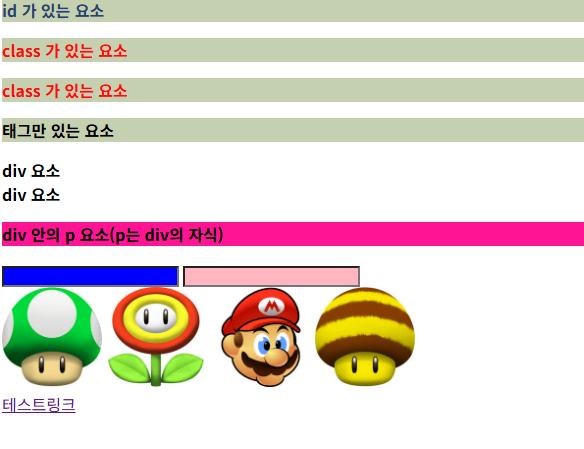
        <p id="myid">id 가 있는 요소</p>
        <!--복수개가 가능하다.-->
        <p class="myclass">class 가 있는 요소</p>
        <p class="myclass">class 가 있는 요소</p>
        <p>태그만 있는 요소</p>

        <div>div 요소</div>

        <div>div 요소
            <p>div 안의 p 요소(p는 div 의 자식)</p>
        </div>

        <input type="text"/>
        <input type="email"/>
        <br/>
        <!-- src=이미지의 주소 alt=이미지에 대한 설명 -->
        <img src="./img/img01.jpg" alt="murshroom"/>
        <img src="./img/img02.jpg" alt="fire flower"/>
        <img src="./img/img03.jpg" alt="마리오"/>
        <img src="./img/img04.jpg" alt="unknwon"/>
        <br/>
        <a href="#">테스트링크</a>
    </body>
</html>


border 속성
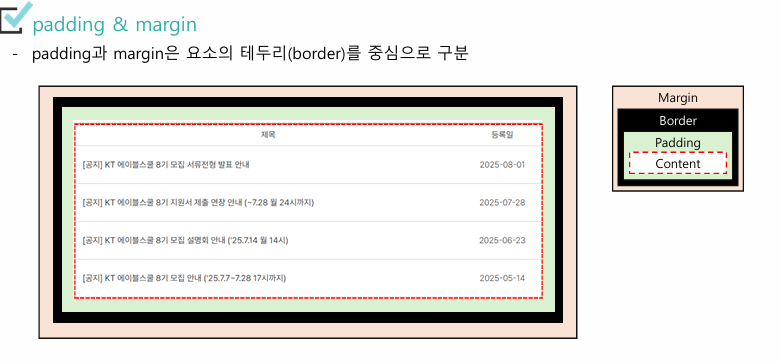
- border는 요소의 콘텐츠와 패딩 바깥을 감싸는 테두리
- border는 두께, 스타일, 색상을 설정
- border-방향-속성 형식으로 각 방향의 속성을 한 번에 제어 가능
border-width : 1px;
border-style : solid; border : 1px solid black;로도 표현할 수 있다.
border-color : black;
border-[top | right | bottom | left]-[width | style | color]
<html>
    <head>
        <meta charset="utf-8">
        <title>border</title>
        <link rel="icon" href="./img/favicon.png">
        <style>
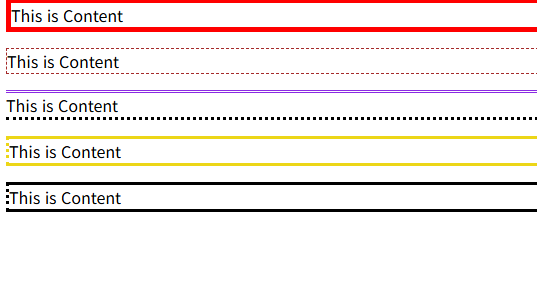
            .one{
                border: 5px solid red;
            }
            .two{
                border-width: thin;
                border-color: brown;
                border-style: dashed;
            }
            .three{
                border-bottom-style: dotted;
                border-top-style: double;
                border-top-color: blueviolet;
                border-right-style: solid;
            }
            .four{
                border-color: crimson;
                border-top-style:solid;
                border-right-style: dotted;
                border-bottom-style: solid;
                border-left-style: dotted;
            }
            .five{
                /*12-3-6-9*/
                border-style: solid dotted solid dotted;
            }
        </style>
    </head>
    <body>
        <p class="one">This is Content</p>
        <p class="two">This is Content</p>
        <p class="three">This is Content</p>
        <p class="four">This is Content</p>
        <p class="five">This is Content</p>
    </body>
</html>
<html>
    <head>
        <meta charset="utf-8">
        <title>CSS</title>
        <link rel="icon" href="./img/favicon.png">
        <style>
            table,th,td{
                border: 1px solid black;
                border-collapse: collapse;
            }

            th,td{
                /* padding: 10px; 모든방향*/
                /*12(top)-3(right)-6(bottom)-9(left)*/
                /* padding : 5px 10px 5px 10px; */
                /*12&6 3&9*/
                padding: 10px 20px;
            }

        </style>
    </head>
    <body>
        <table>
            <thead>
                <tr>
                    <th>이름</th>
                    <th>나이</th>
                </tr>
            </thead>
            <tbody>
                <tr>
                    <td>홍길동</td>
                    <td>70</td>
                </tr>
                <tr>
                    <td>이순신</td>
                    <td>100</td>
                </tr>
                <tr>
                    <td>김지훈</td>
                    <td>50</td>
                </tr>
            </tbody>
        </table>
    </body>
</html>
<html>
    <head>
        <meta charset="utf-8">
        <title>로그인</title>
        <link rel="icon" href="./img/favicon.png">
        <style>
            table, th, td{
                border: 1px solid black;
                border-collapse: collapse;
            }
            th,td{
                padding: 5px 10px;
            }
            input[type="submit"]{
                height: 70px;
            }
        </style>
    </head>
    <body>
        <h3>로그인</h3>
        <hr/>
        <table>
            <tr>
                <th>ID</th>
                <th>
                    <input type="text" name="id"
                        placeholder="아이디를 입력 하세요"/>
                </th>
                <th rowspan="2">
                    <input type="submit" value="로그인"/>
                </th>
            </tr>
            <tr>
                <th>PW</th>
                <th>
                    <input type="password" name="pw"
                        placeholder="비번을 입력 하세요"/>
                </th>
            </tr>
            <tr>
                <th colspan="3">
                    <input type="button" value="회원가입"/>
                    <input type="button" value="비번찾기"/>
                </th>
            </tr>
        </table>
    </body>
</html>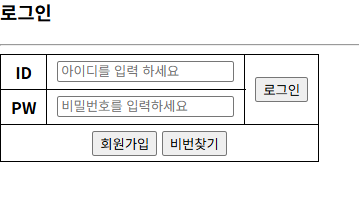
<html>
<head>
<meta charset="utf-8">
<title>회원가입</title>
<link rel="icon" href="./img/favicon.png">
<style>
table, th, td{
border: 1px solid black;
border-collapse: collapse;
}
th, td{
padding: 5px 10px;
}
input[type="text"],input[type="password"]
,input[type="email"],input[type="range"]{
width: 100%;
}
input[type="number"]{
width: 50px;
}
table{
margin-left: 50px;
}
</style>
</head>
<body>
<h3>회원가입</h3>
<hr/>
<table>
<tr>
<th>아이디</th>
<td>
<input type="text" name="id"/>
</td>
</tr>
<tr>
<th>비밀번호</th>
<td>
<input type="password" name="pw"/>
</td>
</tr>
<tr>
<th>비밀번호 확인</th>
<td>
<input type="password"/>
</td>
</tr>
<tr>
<th>이 름</th>
<td>
<input type="text" name="name"/>
</td>
</tr>
<tr>
<th>이 메 일</th>
<td>
<input type="email" name="email"/>
</td>
</tr>
<tr>
<th>생년월일</th>
<td>
<select name="years">
<option value="2000">2000</option>
<option value="2001">2001</option>
<option value="2002">2002</option>
</select>
<select name="month">
<option value="1">01</option>
<option value="2">02</option>
<option value="3">03</option>
</select>
<select name="day">
<option value="1">01</option>
<option value="2">02</option>
<option value="3">03</option>
</select>
</td>
</tr>
<tr>
<th>성 별</th>
<td>
<input type="radio" name="gender" value="남"/>남자
<input type="radio" name="gender" value="여"/>여자
</td>
</tr>
<tr>
<th>취 미</th>
<td>
<input type="checkbox" name="hobby" value="drive"/>
드라이브
<input type="checkbox" name="hobby" value="sports"/>
드라이브
<input type="checkbox" name="hobby" value="game"/>
게임
<input type="checkbox" name="hobby" value="fishing"/>
낚시
</td>
</tr>
<tr>
<th>나 이</th>
<td>
<input type="number" name="age"/>
</td>
</tr>
<tr>
<th>보안등급</th>
<td>
<input type="range" name="level" min="0" max="2"/>
</td>
</tr>
</table>
</body>
</html>

<html>
    <head>
        <meta charset="utf-8">
        <title>background color</title>
        <link rel="icon" href="./img/favicon.png">
        <style>
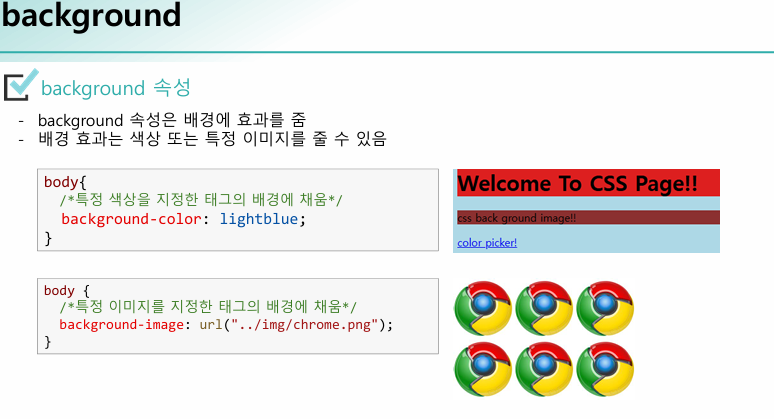
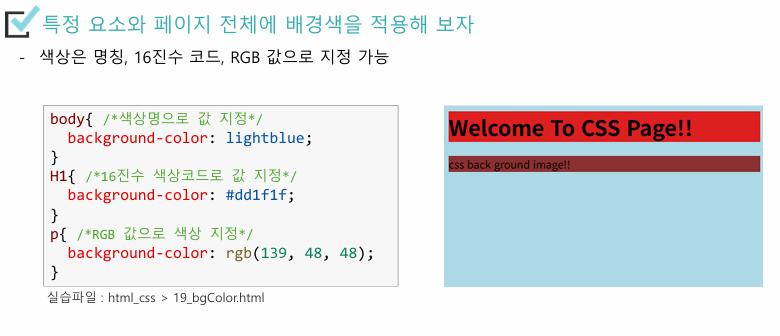
            body{
                /*색상명으로 지정*/
                background-color: lightblue;
            }
            h1{
                /*16진수 코드*/
                background-color: #ff00ff;
            }
            p{
                /*RGB 값*/
                background-color: rgb(0, 102, 0);
            }
        </style>
    </head>
    <body>
        <h1>Welcome To CSS Page!!</h1>
        <p>CSS background image!!</p>
        <div>
            <a href="https://www.w3schools.com/colors/colors_picker.asp"
                target="_blank">color picker</a>
        </div>
    </body>
</html>

<html>
    <head>
        <meta charset="utf-8">
        <title>background image</title>
        <link rel="icon" href="./img/favicon.png">
        <style>
            body{
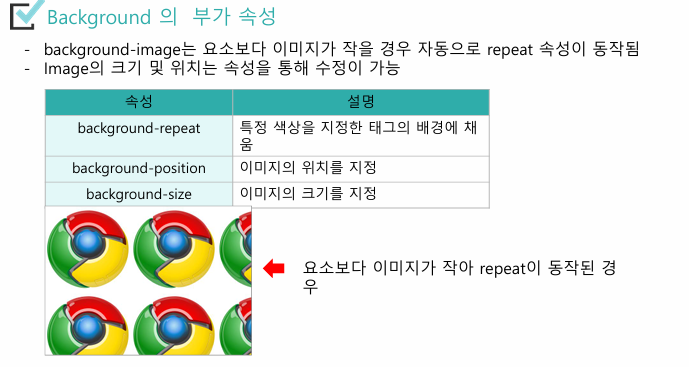
                /*화면보다 이미지가 작으면 repeat 을 하게 된다.*/
                background-image: url('./img/img01.jpg');
                /*background-repeat 으로 반복을 제한 할 수 있다.*/
                /*
                    repeat-x : x 방향으로 반복
                    repeat-y : y 방향으로 반복
                    no-repeat : 반복하지 마라
                    repeat : 모든 방향으로 반복
                */
                background-repeat: no-repeat;
                /*
                    y : top center bottom
                    x : left center right
                */
                /* background-position: top right; */
                /*x y*/
                background-position: 0% 50%;
            }
        </style>
    </head>
    <body>
        <img src="./img/chrome.png"/>
    </body>
</html>

<html>
    <head>
        <meta charset="utf-8">
        <title>CSS</title>
        <link rel="icon" href="./img/favicon.png">
        <style>
            body{
                background-image: url('./img/incheon.jpg');
                /*
                background-size
                cover   : 이미지가 잘리거나 변형되어고 화면에 채운다.
                contain : 비율을 벗어나지 않는 선에서 화면을 맞춘다.
                */
                /* background-size: contain; */
                background-size: 500px 500px;
            }
        </style>
    </head>
    <body>

    </body>
</html>

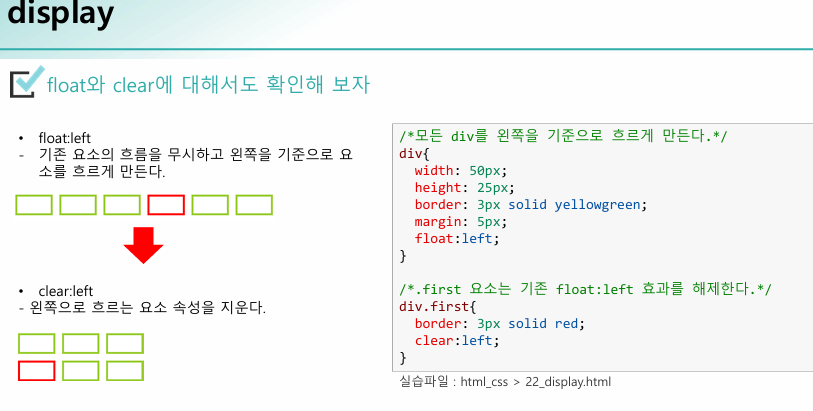
<html>
    <head>
        <meta charset="utf-8">
        <title>display</title>
        <link rel="icon" href="./img/favicon.png">
        <style>
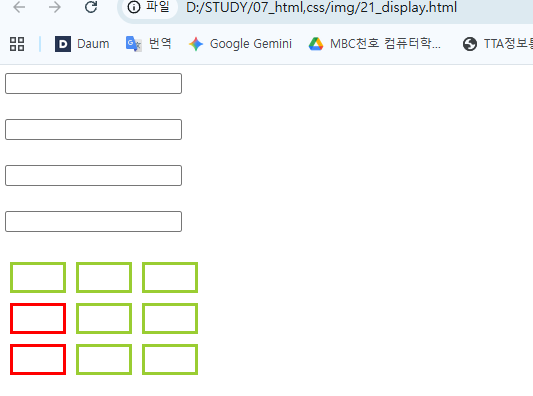
            input[type="text"]{
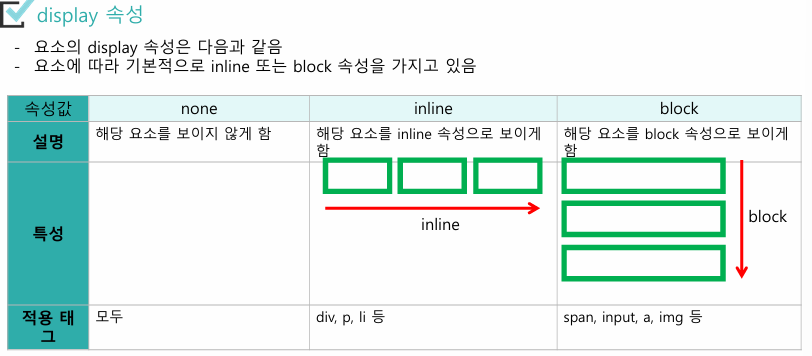
                /*block, inline, none*/
                display: block;
                margin-top: 10px;
            }
            div{
                width: 50px;
                height: 25px;
                border: 3px solid yellowgreen;
                margin: 5px;
                float: left;
            }
            div.first{
                border-color: red;
                clear: left;
            }
        </style>
    </head>
    <body>
        <!--inline 속성 : 좌에서 우로-->
        <input type="text"/>
        <input type="text"/>
        <input type="text"/>
        <input type="text"/>

        <!--blobk : 위에서 아래로-->
        <div></div>
        <div></div>
        <div></div>

        <div class="first"></div>
        <div></div>
        <div></div>

        <div class="first"></div>
        <div></div>
        <div></div>
    </body>
</html>

<html>
    <head>
        <meta charset="utf-8">
        <title>link</title>
        <link rel="icon" href="./img/favicon.png">
        <style>
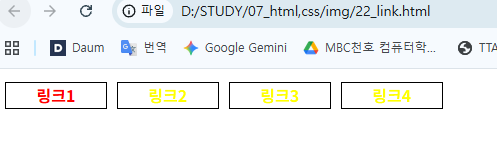
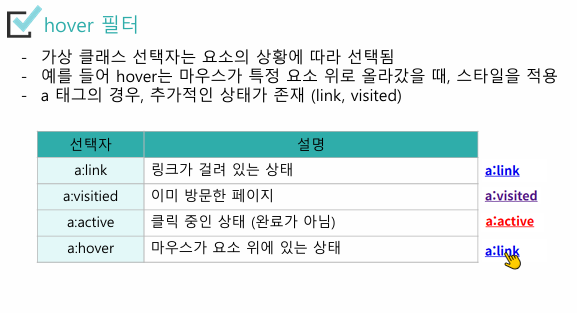
            a:link{/*기본 링크 상태*/
                color:red;
                font-weight: 600;
                text-decoration: none;
            }
            a:visited{/*다녀온 링크*/
                color:orange;
            }
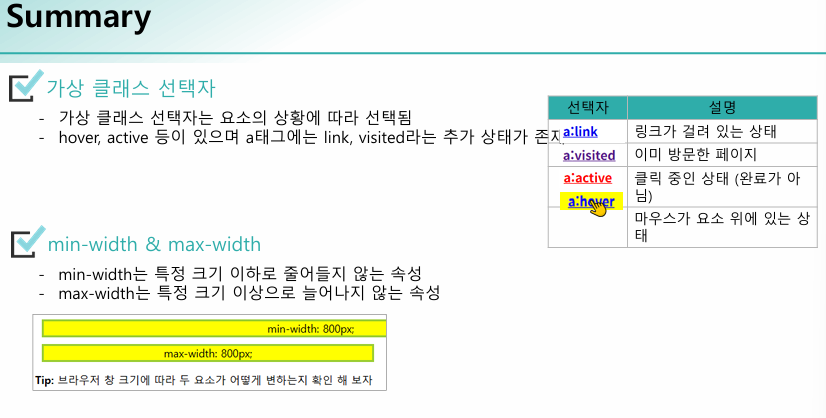
            a:hover{/*마우스 올렸을때*/
                color:blue;
            }
            a:active{/*누르고 있을때*/
                color:green;
            }
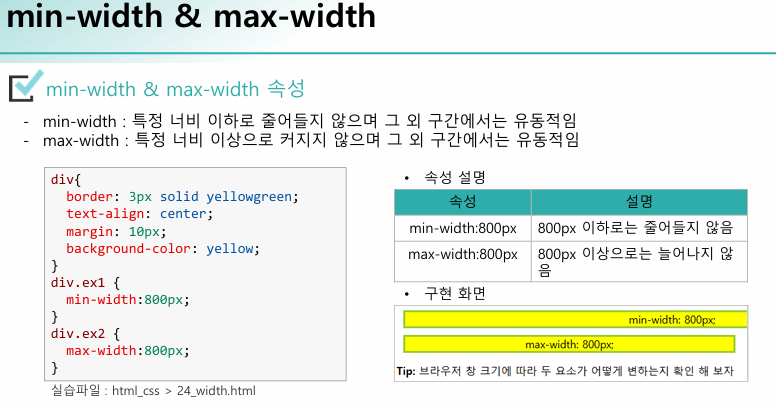
            div{
                width: 100px;
                height: 25px;
                border: 1px solid black;
                margin: 5px;
                text-align: center;
                transition: all 0.5s;
                float: left;
            }
            div:hover{
                width: 200px;
                background-color: lightblue;
            }
        </style>
    </head>
    <body>
        <div>
            <a href="#">Link1</a>
        </div>
        <div>
            <!-- 새창에서 띄운다. -->
            <a href="https://www.google.com/" target="_blank">Link2</a>
        </div>
        <div>
            <!-- 내 창에 띄운다. -->
            <a href="https://www.naver.com/" target="_self">Link3</a>
        </div>
        <div>
            <!-- 부모창에 띄운다.(현재창에 뜨는데?) -->
            <a href="https://www.daum.net/" target="_parent">Link4</a>
        </div>
    </body>
</html>